Overview
This guide provides the technical framework to integrate, configure, and retrieve Runtime Logs from Zebra RFD40 and RFD90 RFID sleds using the RFID SDK for Android. Runtime logging captures firmware diagnostics, communication events, reader state transitions, and error information for troubleshooting, debugging, performance analysis, and support diagnostics.
Using the Runtime Logging APIs, an application can:
- Configure reader logging behavior
- Enable or disable SDK debug logging
- Stream real-time reader diagnostics
- Retrieve internal RAM and FLASH logs
- Export logs for troubleshooting and support analysis
Runtime Logging User Interface
The Logger screen in the Zebra RFID Demo Application provides controls for the four logging operations.
- Enable SDK debug logging
- Configure real-time reader logging
- Retrieve reader logs
- Export logs
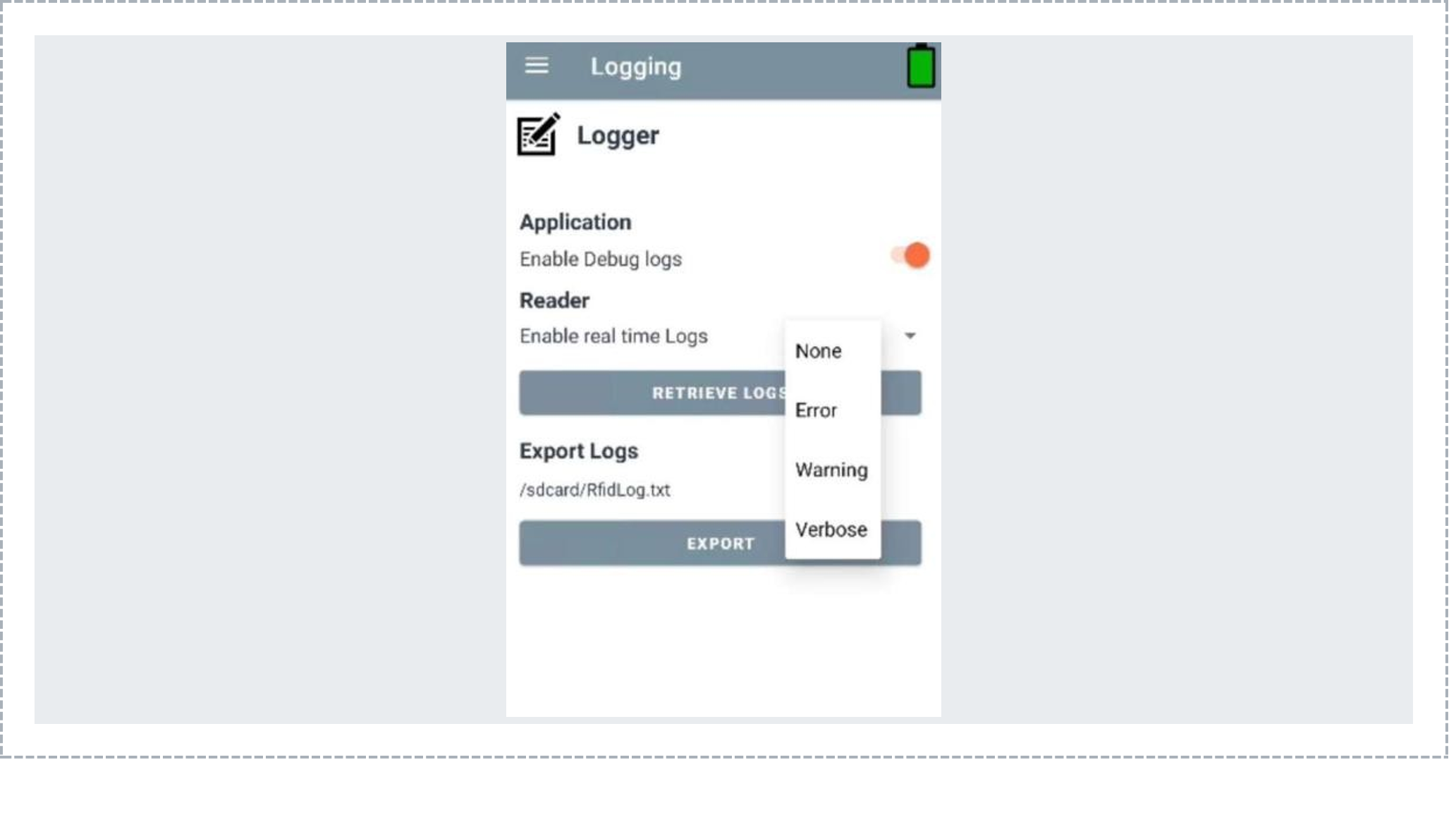
Figure 1. Runtime Logging screen in the Zebra RFID Demo Application.
Runtime Logging Architecture
The Runtime Logging UI provides the following operations:
| Index | Functional Area | Description |
|---|---|---|
| 1 | Enable Debug Logs | Enable or disable SDK debug logging |
| 2 | Enable Real-Time Logs | Configure reader log verbosity |
| 3 | Retrieve Logs | Request RAM and FLASH logs |
| 4 | Export Logs | Export retrieved logs to a local file |
Enable Debug Logs
Enables or disables RFID SDK debug logging. When enabled, SDK diagnostic messages are written to Android Logcat.
SDK API Usage
// Enable debug logs
logger.setLogConfig(LogStates.DEBUGLOGGERSTATE, true);

// Disable debug logs
logger.setLogConfig(LogStates.DEBUGLOGGERSTATE, false);

// Read current state
boolean enabled =
        logger.getLogConfig(LogStates.DEBUGLOGGERSTATE);
Behavior
| State | Behavior |
|---|---|
| ON | SDK logs are written to Logcat |
| OFF | SDK logs are suppressed |
Enable Real-Time Logs
Controls real-time diagnostic information streamed from the connected RFID reader.
Supported Logging Levels
| Logging Level | Description |
|---|---|
| None | Real-time logging disabled |
| Error | Error messages only |
| Warning | Warnings and errors |
| Verbose | All available log information |
setRfidRealTimeReaderLog()
Configures reader-side real-time logging.
logger.setRfidRealTimeReaderLog(RealTimeLogsType.Verbose);
logger.setRfidRealTimeReaderLog(RealTimeLogsType.Warning);
logger.setRfidRealTimeReaderLog(RealTimeLogsType.Error);
logger.setRfidRealTimeReaderLog(RealTimeLogsType.None);
Method Signature
void setRfidRealTimeReaderLog(
        RealTimeLogsType realTimeLogsType)
Exceptions
- InvalidUsageException
- OperationFailureException
- ADMIN_CONNECT_ERROR
Example
try {
    logger.setRfidRealTimeReaderLog(
            RealTimeLogsType.Verbose);
} catch (InvalidUsageException e) {
    Log.e(TAG, "Invalid parameter: " + e.getInfo());
} catch (OperationFailureException e) {
    Log.e(TAG, "Operation failed: " + e.getResults());
}
Query Reader Logging State
Applications can query reader-side log configuration.
void getRfidReaderLogs(
        LogStates logState,
        boolean state)
        throws InvalidUsageException,
               OperationFailureException;
API Summary
| Method | Purpose | Reader Communication |
|---|---|---|
setRfidRealTimeReaderLog() |
Configure reader logging | Yes |
getRfidReaderLogs() |
Query and retrieve reader logs | Yes |
setLogConfig() |
Configure SDK logging | No |
getLogConfig() |
Read SDK logging state | No |
Retrieve Logs
Retrieves historical log data stored in internal RAM and FLASH memory.
try {
    rfidLogger.getRfidReaderLogs(
            LogStates.INTERNALRAMANDFLASHLOGSTATE,
            true);
} catch (InvalidUsageException e) {
    Log.d(TAG, "getRfidReaderLogs failed: " + e.getMessage());
}
Log Storage
| Storage Type | Description |
|---|---|
| RAM | Volatile log storage |
| FLASH | Persistent log storage |
Export Logs
Exports retrieved log data to local device storage.
| Scenario | Behavior |
|---|---|
| Logs Retrieved | Export file is generated |
| Logs Not Retrieved | Prompt the user to retrieve logs first |
Example file:
/sdcard/RfidLog.txt
Receiving Runtime Log Events
Register for Debug Events
Enable debug event notifications.
RFIDController.mConnectedReader.Events.setDebugInfoEvent(true);
Event Registration
public void setDebugInfoEvent(boolean notifyDebugInfoEvent) {
    if (notifyDebugInfoEvent) {
        registerForNotification(RFID_EVENT_TYPE.DEBUG_INFO_EVENT);
    } else {
        unRegisterForNotification(RFID_EVENT_TYPE.DEBUG_INFO_EVENT);
    }
    this.m_bDebugInfoEvent = notifyDebugInfoEvent;
}
Protocol Processing
if (eventType == RFID_EVENT_TYPE.DEBUG_INFO_EVENT) {
    DEBUG_INFO_EVENT event = new DEBUG_INFO_EVENT();
    event.setLevel((String) responseEvent.take());
    event.setMessage((String) responseEvent.take());
    debugInfoEventQueue.offer(event);
}
Receive Events in the Application
private void notificationFromGenericReader(RfidStatusEvents rfidStatusEvents) {
    if (rfidStatusEvents.StatusEventData.getStatusEventType()
            == STATUS_EVENT_TYPE.DEBUG_INFO_EVENT) {
        String level = rfidStatusEvents.StatusEventData.debugInfoData.getLevel();
        String message = rfidStatusEvents.StatusEventData.debugInfoData.getMessage();
        Log.d(TAG, "Level: " + level);
        Log.d(TAG, "Message: " + message);
    }
}
Real-Time Logs vs Retrieved Logs
| Type | Description |
|---|---|
| Real-Time Logs | Streamed immediately through DEBUG_INFO_EVENT |
| Retrieved Logs | Historical RAM and FLASH logs retrieved on demand |