Overview
The Zebra Data Service (ZDS) system is a set of background services running on all supported Zebra devices and is responsible for collecting and uploading analytics data coming from ZDS plug-ins and Zebra-authorized third-party apps. Data is uploaded to the Zebra analytics database every 24 hours by default with transport secured with HTTPS. ZDS accepts configuration changes to the upload interval, data-collection events and other parameters through a barcode scanned by the device. Learn more about changing ZDS parameters.
ZDS components are self-updating to ensure that devices contain the most up-to-date features and bug-fixes.
Learn more about ZDS updates.
New in ZDS 14.0.2.1077
- Collects numerous additional data elements ( See below)
- Toggles data collection On/Off on devices running Android 15 (and later):
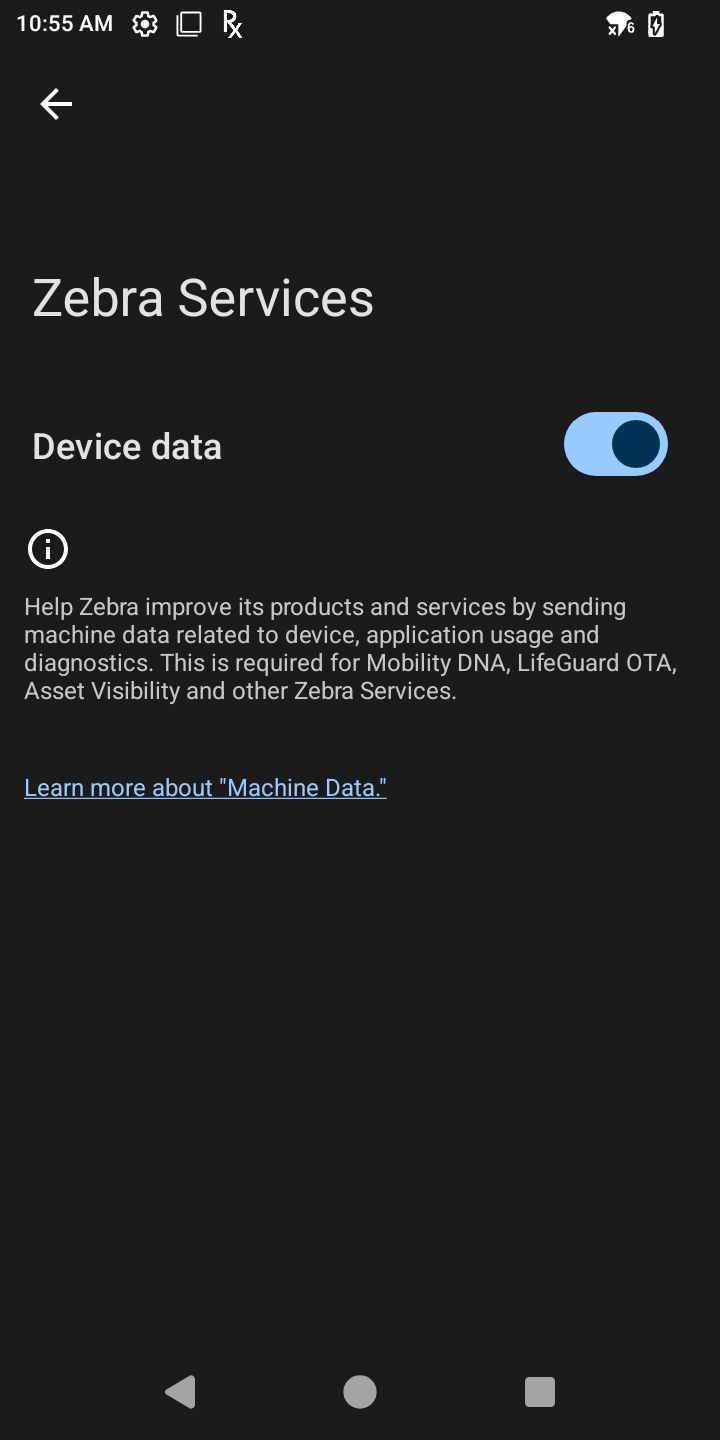 ZDS settings panel on Android 15.
Click image to enlarge; ESC to exit.
Data Collected
NEW Data elements collected by ZDS 14.0.2.1077:
- Current temperature of:
- Battery
- CPU, GPU
- Device skin
- On PS20/PS30 devices:
- Current connection
- Cradle part number and serial number, model, port configuration, device rack position (at time of last docking)
- Overall battery consumption (usage of top energy consumer)
- CPU utilization percentage at collection time
- Application usage: (start/stop times of foreground apps)
- Details of eSIM configuration, network type (e.g. 4G, LTE)
- More accurate device-drop data
Also collects:
- Latency of the preferred network connection
- EMM system vendor, enrollment state (fully managed, device owner, etc.)
- Device platform (CPU model)
- Bluetooth MAC address
- IMEI2 number
- Mobile signal strength
- Wi-Fi signal strength
- GPS statistics:
- Mobile signal strength history
- Wi-Fi signal strength history
- Device "Build Fingerprint" including:
- Device model number
- Android version
- Build ID
- Device serial number
- Device usage data
- OS image, LifeGuard and security patch levels applied
- Available RAM
- Low-RAM events
- Device storage (flash) information and health
- Battery life and health information
- Battery charge/discharge status
- Battery errors
- Wi-Fi (WLAN) connection events
- Airplane Mode usage
- Screen brightness min, max and average
- Cellular (WWAN) connection events (if applicable)
- Static MAC address
- Minimum, maximum and average WWAN signal levels
- Battery scale (maximum charge level) data
- Device Name
- Details about application crashes (fatal exceptions) †¶
- Device hardware part number ‡
- Data traffic statistics (as applicable) for:
- Bluetooth
- Cellular (WWAN)
- Ethernet
- Wi-Fi (WLAN)
- Location data (as applicable) for:
- Cellular
- GPS
- Wi-Fi (WLAN)
- WWAN signal strength fluctuations
- System app info and usage
- Zebra app info and usage data, including for:
- DataWedge
- Enterprise Home Screen
- EMDK for Android
- EMDK for Xamarin
- MX STATS
- SimulScan
- StageNow
- Scanner information and usage statistics
- Reboots triggered by the system or an app
- Application Not Responding (ANR) events
- Data collected ONLY when enabled by administrator:
- Auto rotate setting in device usage
- Bluetooth scanner battery stats
- CPU utilization by app*
- Device entry into doze mode and/or maintenance window
- Device free-fall detection events
- Device unlock events
- Dynamic MAC addresses in WLAN info
- Minimum, maximum and average WLAN signal levels
- Storage space utilization by app*
* Supported only on devices running Android 10 or later
† Supported only on devices running Android 11 or later
‡ Supported only on devices running Android 13 or later
¶ Requires LifeGuard update from Nov. 2023 or later
Learn about battery scale from the Android developer community.
ZDS Support Notes
- Data collection is enabled by default
- Data collection and upload frequency is configurable (default = every 24 hours)
- ZDS is compatible with all Zebra devices running Android 7 (and later)
- ZDS comes preinstalled on all devices with Android 7 (and later)
- Zebra offers active ZDS support for devices running Android 7 and later
Please contact Zebra Support for more information.
Also See
- FAQ | Frequently asked questions about ZDS
- ZDS Setup Guide | How to check whether ZDS is installed and/or enabled.